Download Driver Booster Pro for Windows : Keep your drivers updated
Driver Booster Pro is a tool designed to scan your PC for outdated drivers and update them. When you download Driver Booster Pro for Windows, it continuously checks for outdated drivers for your PC and downloads and updates them. Every driver package is downloaded and set up through this tool, and batch downloads make it easy to get multiple driver updates simultaneously. With Driver Booster Pro, you can boost your system performance, update your drivers, and fix hardware issues in just one click. It is an essential tool for maintaining a smooth-running PC—basically updating device drivers before they create problems that affect the performance of your PC.
An intuitive interface
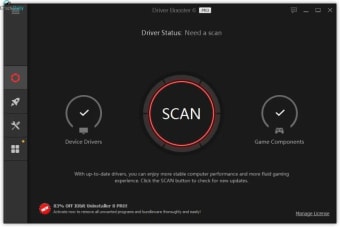
Driver Booster Pro features a user-friendly interface. The tool has a dashboard where you can see and control all its features. When you start the program, you will first see the Scan button. This button lets you check on all of your PC’s drivers. You can start or stop the scanning whenever you want, with a re-scan function also offered by this button. The scan results page lets you see the list of outdated drivers and game components, with the results categorized as outdated drivers, faulty drivers, not-installed game drivers, and missing drivers. The main dashboard has sidebars on the left and right side. The right sidebar lets you check your PC’s information, while the left sidebar has the following functions besides Scan: Boost, Action Center, and Tools. The Driver Booster Pro interface is dark grey, but you can personalize it to any color you like, with the Options icon offering different skin options.
What is it used for?
Driver Boost Pro is an essential tool for a smooth-running PC. You can perform manual and automatic driver scans, updates, and more using this tool. Let’s go through some things you can achieve with Driver Boost Pro.
Customize and automate driver scans: Using this tool, you can customize how it scans for drivers in the Settings tab, choosing either Latest First or Stability First, with the latter being the safer option. You can also opt for manual or automatic scans, with manual scans initiated by clicking the San button, while automated scans can be enabled from the Settings tab.
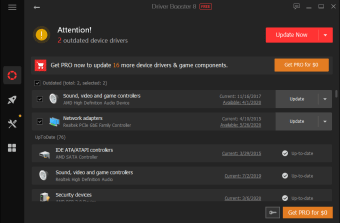
View scan results: Once you have started the scan, and it stops, you will be presented with the results. The scan results show your PC’s condition by listing the outdated game and device drivers. The drivers will be listed as outdated drivers, faulty drivers, not-installed game drivers, and missing drivers.
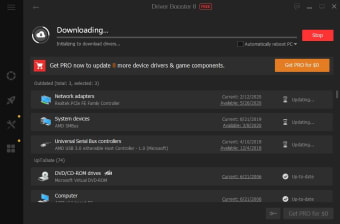
Update and download drivers: Once the scan is complete, and you have viewed the results, you have two options. You can click Update Now to update all the drivers at once, or update the drivers one-by-one by clicking the Update button next to each driver. Once you start the update process, the drivers will begin downloading, and you can pause and resume the process anytime you want.
Configure how automatic updates work: Driver Booster Pro lets you configure how automatic updates work. First, you can set them to download when the system is idle, and then you will have two options: have the updater only download the updates or have the updater download and install the updates.
Ignore critical drivers from updating: Sometimes, updating some drivers may cause problems when your system isn’t fully compatible with the drivers. When you notice such issues after a specific driver is updated, you can ignore current updates for that driver or all future updates until a more stable version is available.
Activate silent mode: Driver Booster Pro has a quiet mode that you can activate to prevent the tool from sending you notifications while you’re working.
Boost system performance: If your system is lagging when playing games or multitasking, Driver Boost Pro can assist in two ways. The first is through Game Boost, which stops unnecessary programs and frees up system resources for a smoother gaming experience. The other option is System Optimize, which improves overall performance by cleaning junk files, optimizing internet speed, and fixing registry issues.
Key features
Driver Booster Pro has several valuable features to help your PC run at optimal performance:
Driver updates: This feature scans all of your PC’s drivers and reports which ones are outdated and missing. You can download and update the latest versions for the outdated ones and new drivers for missing one.
Backup and restore: This feature in Driver Boost Pro lets you back up and restore your drivers when needed. It is essential because some drivers may cause system issues, and in such cases, you must revert to the backup version for your system to perform as required.
Automatic scans: This feature lets you schedule Driver Booster Pro to automatically scan your PC’s drivers. You can set it to scan daily, weekly, or when starting your PC so you always have your drivers updated.
Game Boost: Game Boost stops all unnecessary apps from running during gaming for the smoothest gaming experience. This feature ensures that game-ready drivers and components are continually updated for the best gaming experience.
Fix common problems: Driver Booster Pro has tools to fix some of the most common issues you encounter while using computers. Issues like network failure, lack of sound, wrong resolution, device error, and so on can be fixed with this tool.
Why download Driver Booster Pro for Windows
Driver Booster Pro is an easy-to-use driver updater with a vast database that can solve most of your PC’s problems with just one click. Many driver management tools, like Driver Easy, DriverMax, and Driver Genius, are available, but Driver Booster Pro is among the best. It has all the necessary features to ensure your drivers are constantly updated. It is available for 32- and 64-bit Windows PCs supporting Windows 7 or later versions, and you only need 200MB storage and 1GB RAM to run it. Some of its benefits include:
- Automatic scans and updates
- Driver backup and restore
- Vast driver database
- One-click download and update
- Improves gaming experience